> ## Documentation Index
> Fetch the complete documentation index at: https://help2.studystash.com/llms.txt
> Use this file to discover all available pages before exploring further.

# How do I enable StudyStash in my Canvas course?

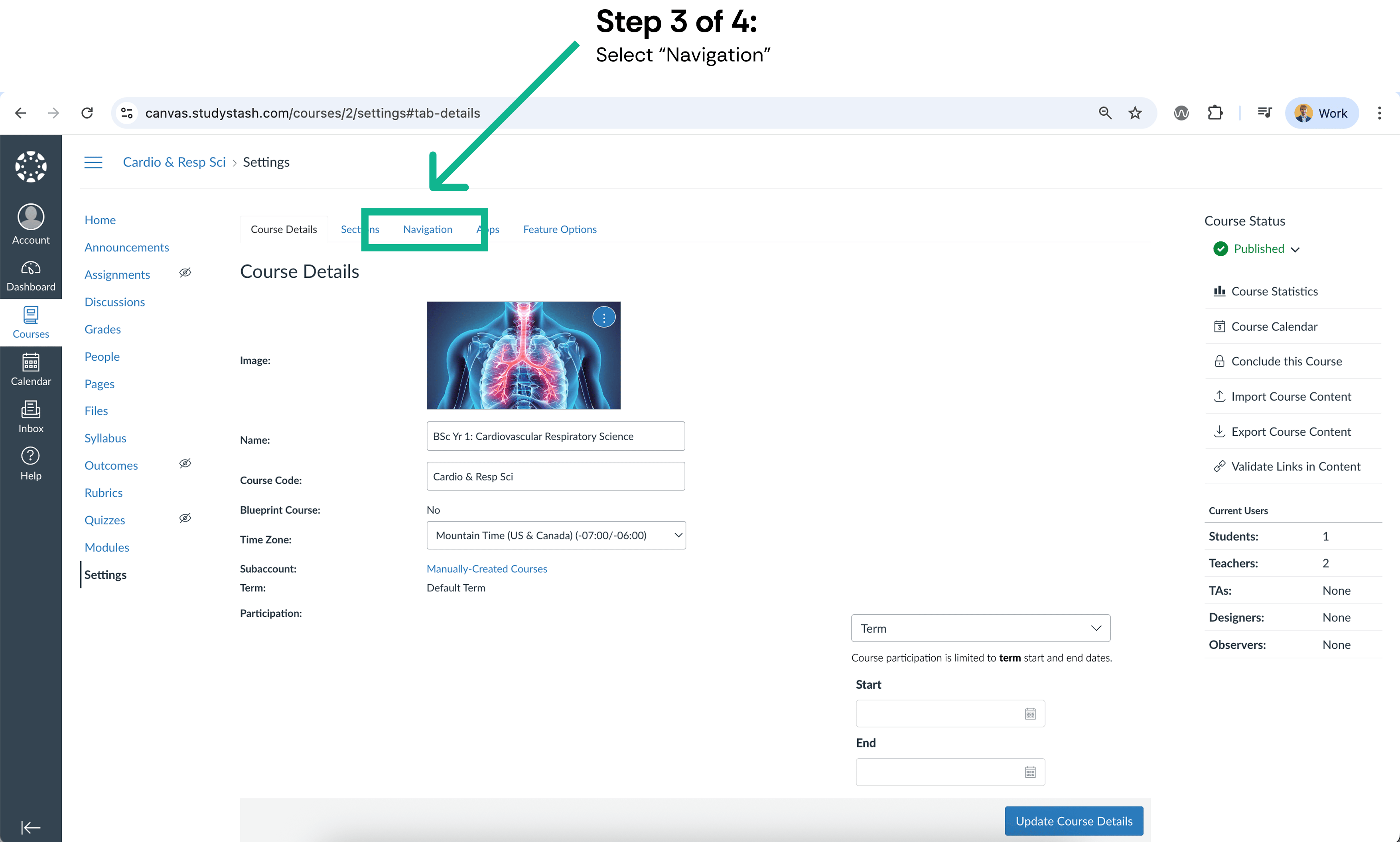
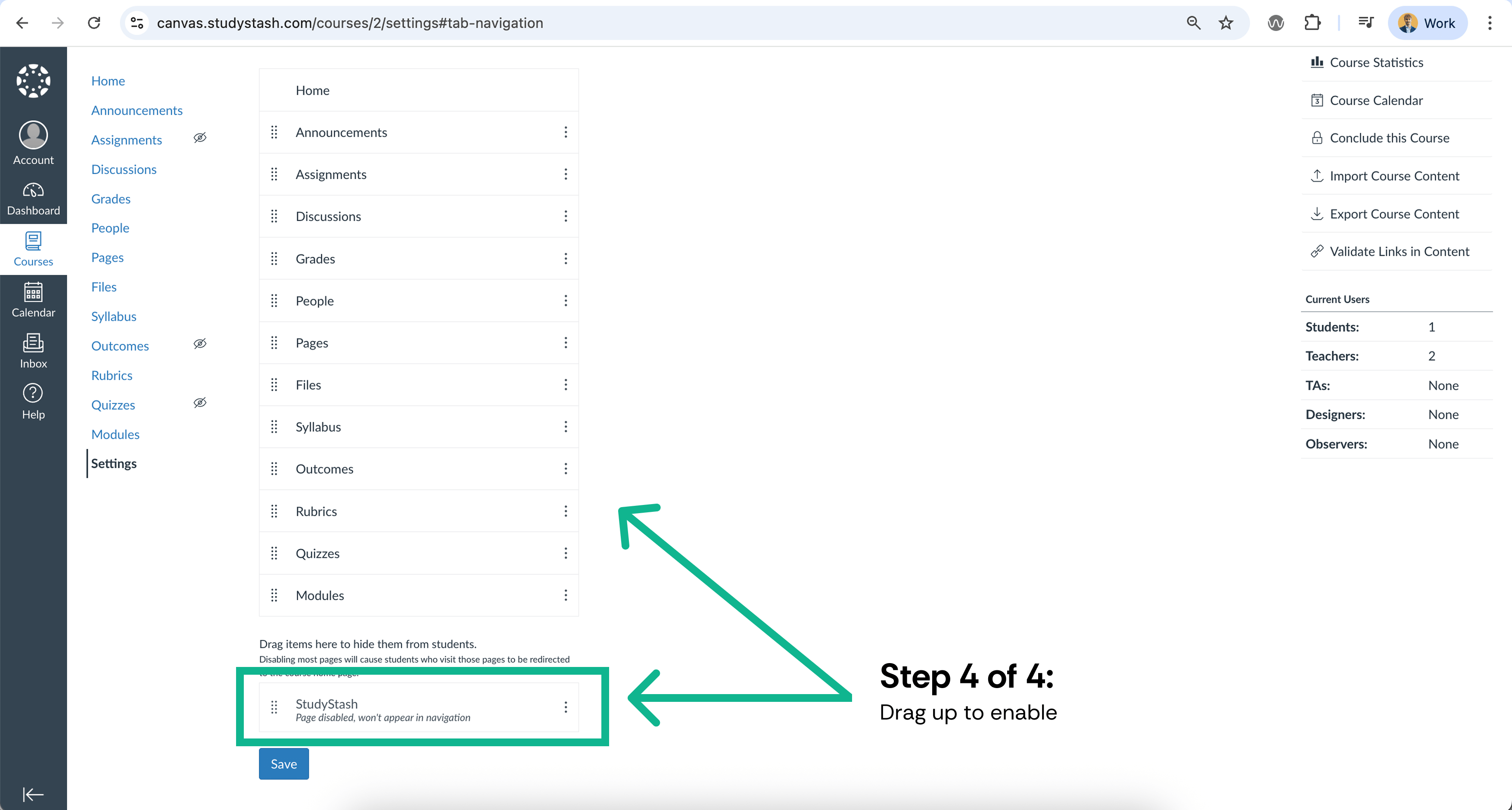
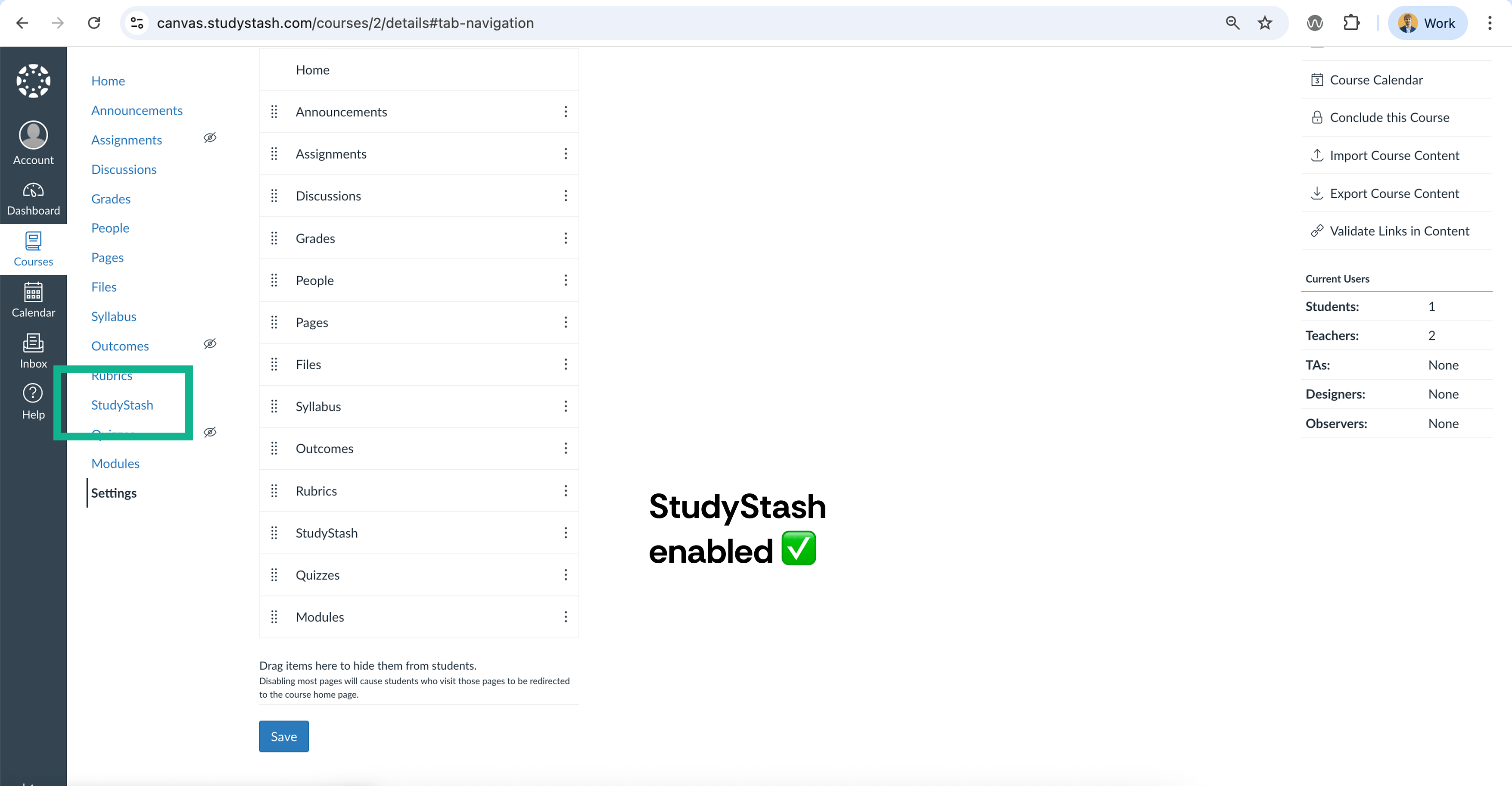
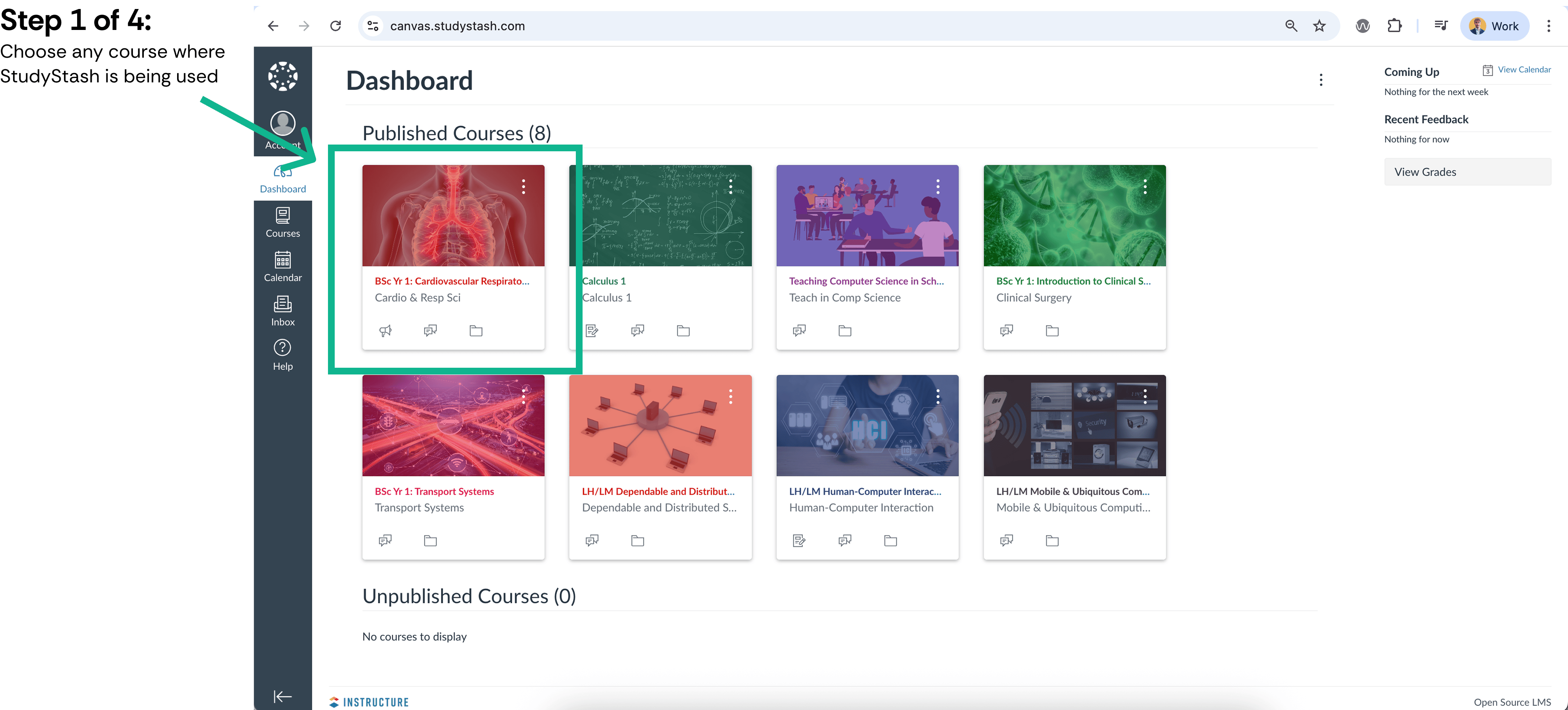
> If your course has access to StudyStash, enabling it is simple. Follow the 4 steps below to let your students start using the platform within Canvas. (2 min read)
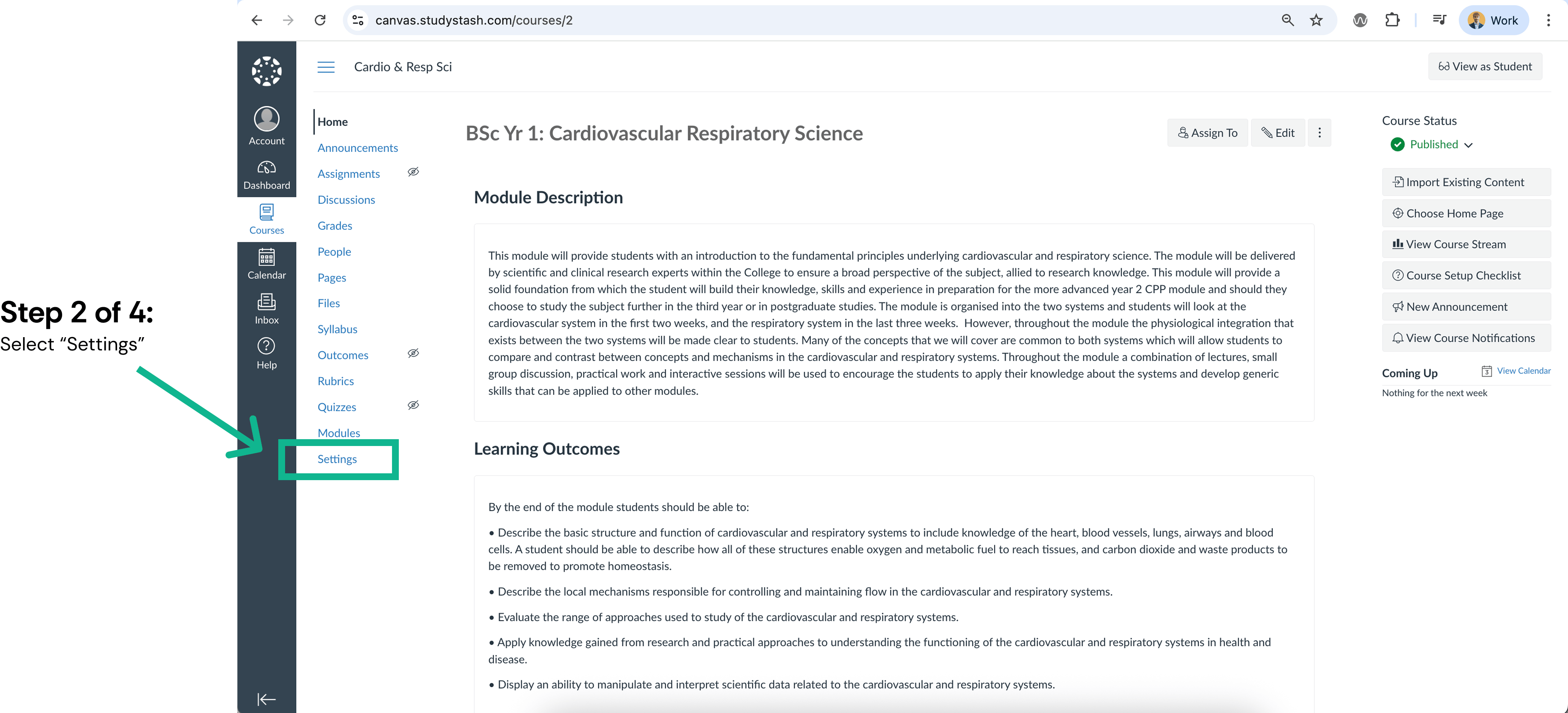
<Frame className="ss-screenshot" caption={"**Figure 1.** How do I enable StudyStash in my Canvas course? — screenshot 1"}>
  <img loading="lazy" src="https://mintcdn.com/studystash-help/UbXlxW0z5agaJ_Cy/assets/87130114/87097347-p1.png?fit=max&auto=format&n=UbXlxW0z5agaJ_Cy&q=85&s=8f0f0a01a04228b66ff8ed402cdb170f" alt="How do I enable StudyStash in my Canvas course? — screenshot 1" width="4188" height="1896" data-path="assets/87130114/87097347-p1.png" />
</Frame>

<Frame className="ss-screenshot" caption={"**Figure 2.** How do I enable StudyStash in my Canvas course? — screenshot 2"}>
  <img loading="lazy" src="https://mintcdn.com/studystash-help/UbXlxW0z5agaJ_Cy/assets/87130114/86999044-p2.png?fit=max&auto=format&n=UbXlxW0z5agaJ_Cy&q=85&s=4023bab19400530a94e7a485649bb86e" alt="How do I enable StudyStash in my Canvas course? — screenshot 2" width="4136" height="1880" data-path="assets/87130114/86999044-p2.png" />
</Frame>

<Frame className="ss-screenshot" caption={"**Figure 3.** How do I enable StudyStash in my Canvas course? — screenshot 3"}>
  <img loading="lazy" src="https://mintcdn.com/studystash-help/UbXlxW0z5agaJ_Cy/assets/87130114/87130123-p3.png?fit=max&auto=format&n=UbXlxW0z5agaJ_Cy&q=85&s=0e14856b6d928fa79c7c24992f9e6513" alt="How do I enable StudyStash in my Canvas course? — screenshot 3" width="3510" height="2110" data-path="assets/87130114/87130123-p3.png" />
</Frame>

<Frame className="ss-screenshot" caption={"**Figure 4.** How do I enable StudyStash in my Canvas course? — screenshot 4"}>
  <img loading="lazy" src="https://mintcdn.com/studystash-help/UbXlxW0z5agaJ_Cy/assets/87130114/86999064-p4.png?fit=max&auto=format&n=UbXlxW0z5agaJ_Cy&q=85&s=483b10e3f330874bfda9b0afe53dbc8d" alt="How do I enable StudyStash in my Canvas course? — screenshot 4" width="3510" height="1880" data-path="assets/87130114/86999064-p4.png" />
</Frame>

<Frame className="ss-screenshot" caption={"**Figure 5.** How do I enable StudyStash in my Canvas course? — screenshot 5"}>
  <img loading="lazy" src="https://mintcdn.com/studystash-help/UbXlxW0z5agaJ_Cy/assets/87130114/87130129-p5.png?fit=max&auto=format&n=UbXlxW0z5agaJ_Cy&q=85&s=a531dc0301ee2db25e435fc55dd198f4" alt="How do I enable StudyStash in my Canvas course? — screenshot 5" width="3510" height="1824" data-path="assets/87130114/87130129-p5.png" />
</Frame>

<Warning>
  **Caution:** If StudyStash is not an option in Step 4 then it has not been enabled for your course by your institute. Please email us at [support@studystash.com](mailto:support@studystash.com) or contact your Student Success Manager.
</Warning>


This documentation is built and hosted on [Mintlify](https://mintlify.com), a developer documentation platform.