> ## Documentation Index
> Fetch the complete documentation index at: https://help2.studystash.com/llms.txt
> Use this file to discover all available pages before exploring further.

# How do I export student data from Moodle into a CSV file?

> this section shows how to export student data into a CSV file so that it can be uploaded into StudyStash.

Step 1: Log into Moodle and click the **“Manage Courses’** icon.
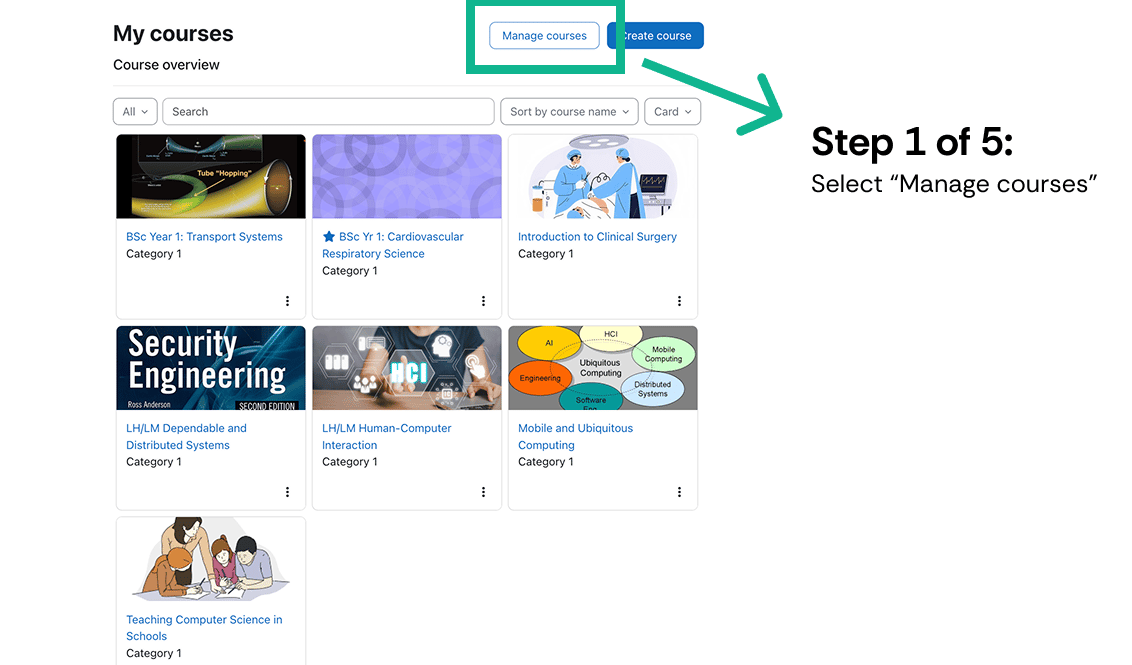
<Frame className="ss-screenshot" caption={"**Figure 1.** How do I export student data from Moodle into a CSV file? — screenshot"}>
  <img loading="lazy" src="https://mintcdn.com/studystash-help/FFz54l9hIeIDPaHl/assets/142049281/141033483-image-20260526-101902.png?fit=max&auto=format&n=FFz54l9hIeIDPaHl&q=85&s=6ef5e3231f55dd78002b8f319e0bd88a" alt="How do I export student data from Moodle into a CSV file? — screenshot" width="1132" height="665" data-path="assets/142049281/141033483-image-20260526-101902.png" />
</Frame>

Step 2: Select the course you wish to export data from

Step 3: Click on the **enrolled users** icon
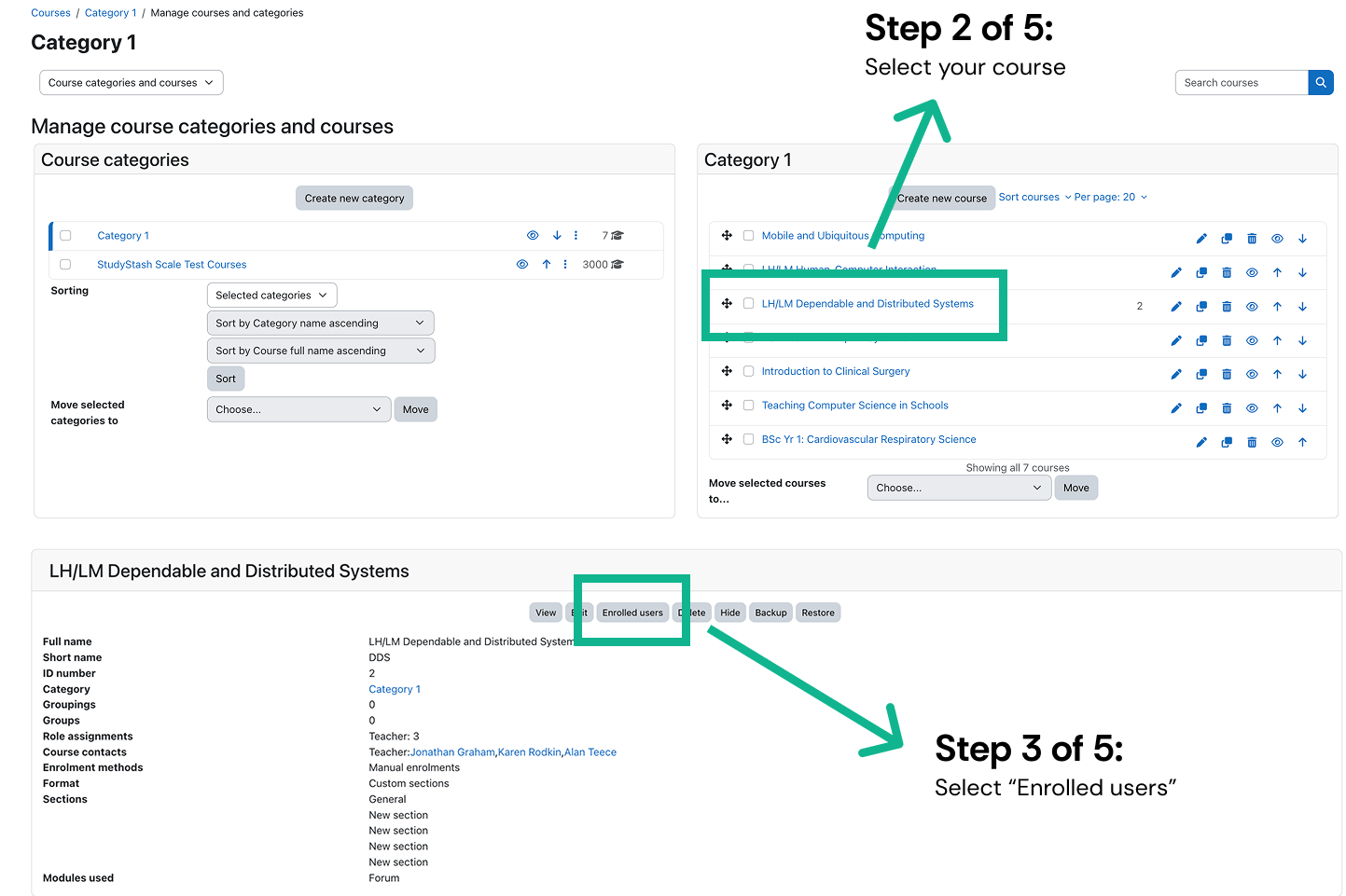
<Frame className="ss-screenshot" caption={"**Figure 2.** How do I export student data from Moodle into a CSV file? — screenshot"}>
  <img loading="lazy" src="https://mintcdn.com/studystash-help/FFz54l9hIeIDPaHl/assets/142049281/141033491-image-20260526-102021.png?fit=max&auto=format&n=FFz54l9hIeIDPaHl&q=85&s=f2b322a5f933274a08f7fd779726a6b5" alt="How do I export student data from Moodle into a CSV file? — screenshot" width="1443" height="961" data-path="assets/142049281/141033491-image-20260526-102021.png" />
</Frame>

Step 4: Select the top box which will select ‘all’

Step 5: Select “C**omma Separated Values**” (csv) as the file type
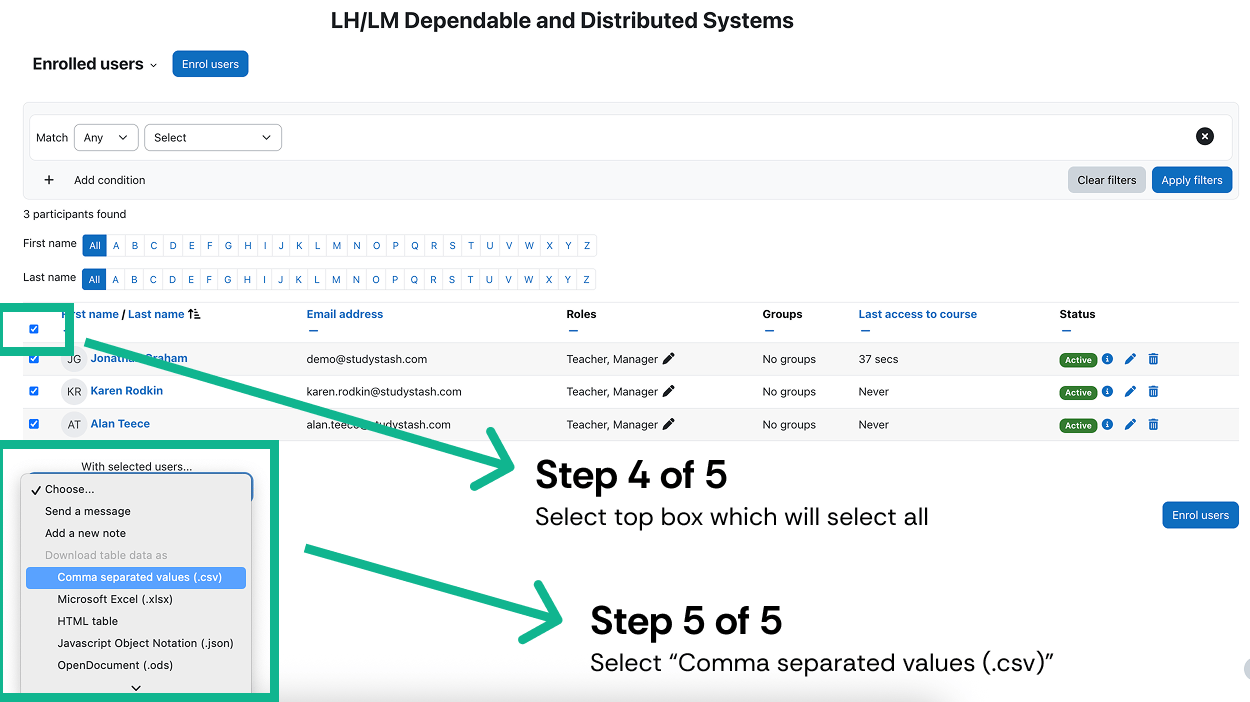
<Frame className="ss-screenshot" caption={"**Figure 3.** How do I export student data from Moodle into a CSV file? — screenshot"}>
  <img loading="lazy" src="https://mintcdn.com/studystash-help/FFz54l9hIeIDPaHl/assets/142049281/141983748-image-20260526-102231.png?fit=max&auto=format&n=FFz54l9hIeIDPaHl&q=85&s=805670ce2898e9398f82587b8b657ffa" alt="How do I export student data from Moodle into a CSV file? — screenshot" width="1250" height="702" data-path="assets/142049281/141983748-image-20260526-102231.png" />
</Frame>


This documentation is built and hosted on [Mintlify](https://mintlify.com), a developer documentation platform.